> For the complete documentation index, see [llms.txt](https://docs.faceit-cheats.com/llms.txt). Markdown versions of documentation pages are available by appending `.md` to page URLs; this page is available as [Markdown](https://docs.faceit-cheats.com/premium-cheat/how-to-run.md).
# How to run
1. Before launching the cheat for the first time, make sure that you have completed the [First steps before running.](/premium-cheat/first-steps-before-running.md)
2. Go to the Premium CS2\data folder and run the "read" file.
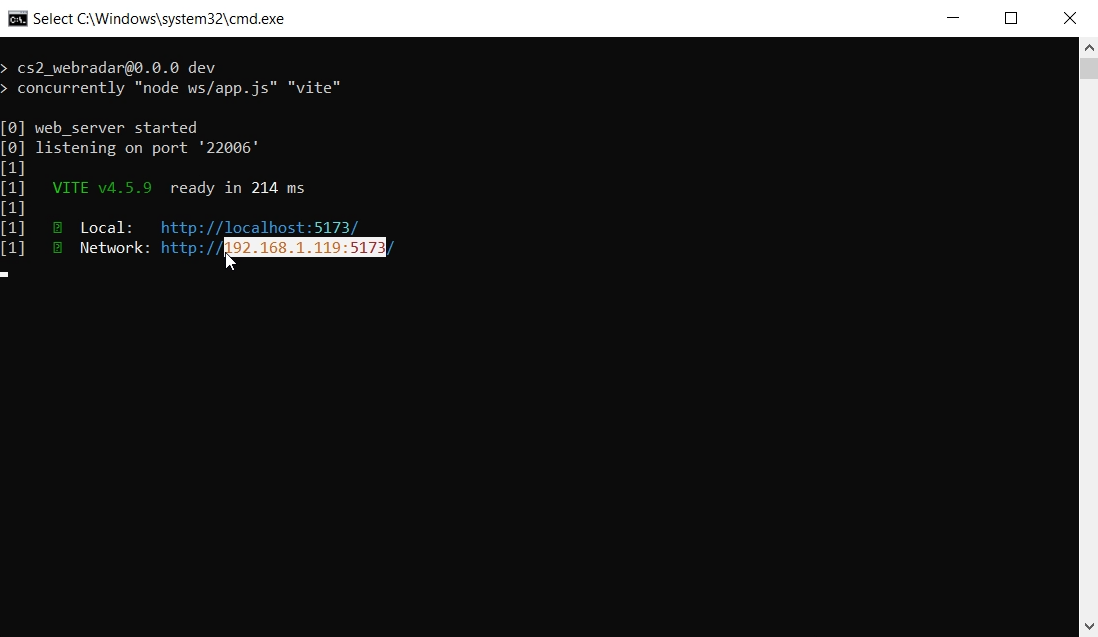
3. Copy Network IP
4. Run the "start" file (don't worry if nothing visually happened after starting the start file, it's normal).
5. Open a browser and paste the copied IP address. This page should open.
6. Unzip LoaderPriv\[7.3.6] from the Premium CS2 folder (cheat loader will be deleted every time it's launched so you need to unpiz it every time).
7. Run LoaderPriv\[7.3.6].exe.
8. Enter the cheat activation key that the seller gave you (don't confuse it with the WinRAR password).
9. Wait until the message "Waiting for the game to open..." appears.
10. Launch Faceit AC (or any other anti-cheat you need).
11. Launch CS2.
12. When the game starts, press the "Home" key on your keyboard (visually nothing will happen, this is normal).
13. Log in to the server (Faceit, MM, Premier, or just a server with bots for test).
14. Minimize the game and open a browser with a previously opened tab. There should be a radar hack.
15. You can also display the radar on your phone, tablet, or share it with a friend by giving them the IP address of the radar page.
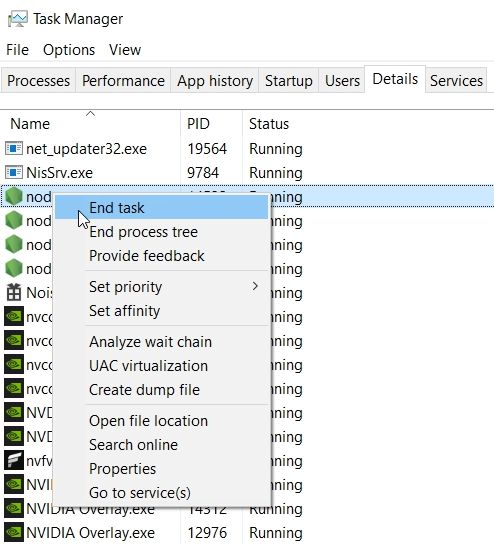
If you have closed the game and want to run the cheat again, first go to the Task Manager, the Details tab, and find the processes node.exe and end them all. After that, repeat these instructions.
---
# Agent Instructions
This documentation is published with GitBook. GitBook is the documentation platform designed so that both humans and AI agents can read, navigate, and reason over technical content effectively. Learn more at gitbook.com.
## Querying This Documentation
If you need additional information that is not directly available in this page, you can query the documentation dynamically by asking a question.
Perform an HTTP GET request on the current page URL with the `ask` query parameter, and the optional `goal` query parameter:
```
GET https://docs.faceit-cheats.com/premium-cheat/how-to-run.md?ask=&goal=
```
`ask` is the immediate question: it should be specific, self-contained, and written in natural language.
`goal` is optional and describes the broader end goal you are ultimately trying to accomplish on behalf of the user. GitBook uses it to tailor the answer towards what is most useful for that goal.
The response will contain a direct answer to the question and relevant excerpts and sources from the documentation.
Use this mechanism when the answer is not explicitly present in the current page, you need clarification or additional context, or you want to retrieve related documentation sections.